The whole series has one through-line. When you pay more for a model, you usually buy a different thing than the one you assumed you were buying. Part 1 and 2 found that on the language side, where bigger didn't reliably mean better or safer. This part takes the same scalpel to image generation. The question is narrow and practical. If I pay 3× more per image, does the model render what I actually asked for, or does it just render it more beautifully?
To test it I gave Imagen 4 a genuinely hard job: recreate a single reference photo, a cluttered vintage-vehicle workshop, across all three price tiers. Then I scored each output against the reference on a 15-element checklist.
One scope note up front, so nothing here reads as more than it is. This post is frontier-only. It measures task-adherence across Imagen's three price tiers. It is not a local-vs-cloud comparison. The local half (Z-Image / FLUX on my own GPU) isn't benchmarked yet. It's pending a ComfyUI install and model downloads, and when it runs, it becomes the head-to-head. For now, the Imagen tier result is clear enough to write down on its own.
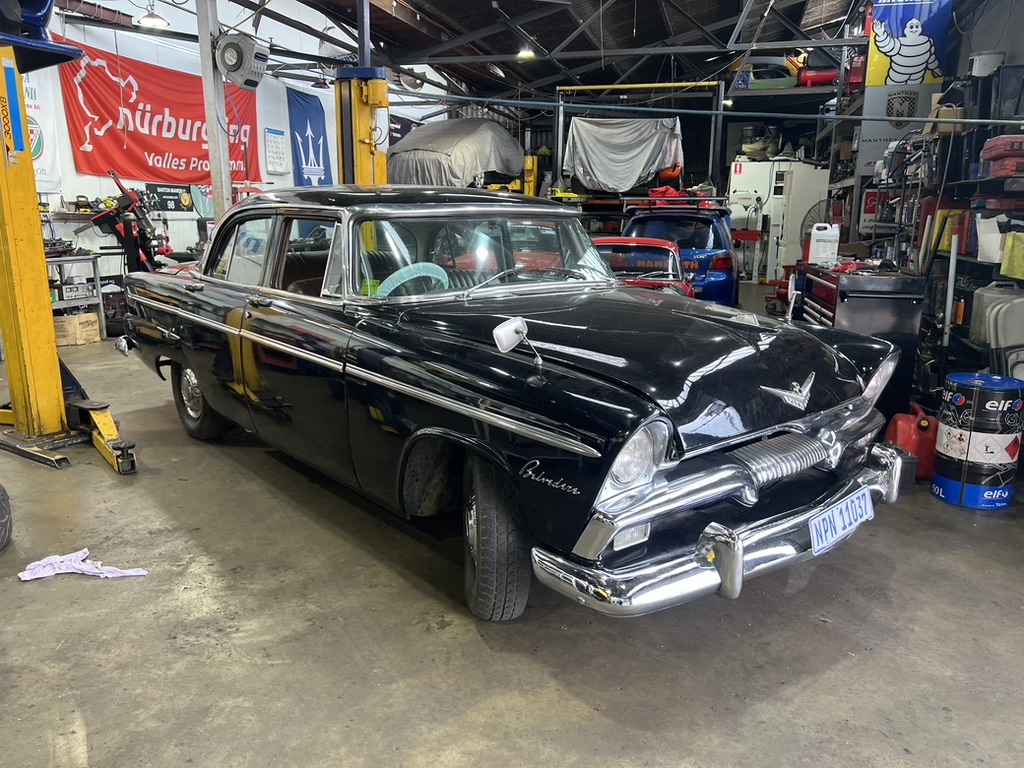
The setup
Three tiers, one prompt, one reference:
- Imagen 4 Fast, ~$0.02/image
- Imagen 4 Standard, ~$0.04/image
- Imagen 4 Ultra, ~$0.06/image
Total spend for the 3-tier car run: $0.12. I scored each on element coverage (did it draw the things in the scene?), in-image text legibility, photorealism, resemblance to the reference, and a blended overall-adherence number.
82→90 overall adherence, fast→ultra · 3× the price premium
The headline that isn't the story
All three tiers nailed the scene. Each reproduced roughly 13–14 of the 15 prompt elements: the car lifts, parts shelving, the racing and Maserati banners, the Michelin Man, oil drums, the dust-sheet-covered car, the red car parked in back. That's impressive, and it's the part everyone expects to be hard.
Overall adherence climbed exactly the way the pricing page wants you to believe it will: 82 → 89 → 90 from fast to standard to ultra. So if you stop reading at the summary number, the story is "ultra is best, mild diminishing returns, pay up." And ultra genuinely does win something real. Photorealism, 95% against fast's 82%. The chrome, the reflections, the micro-detail in the metalwork: that's where the extra money landed.
The problem is that the part the extra money landed on isn't the part that breaks.
Where the money didn't go: text
Look at the banners. The single most useful thing the model could get right on a workshop scene is the legible text on the signage, and that's exactly where the price premium evaporates.
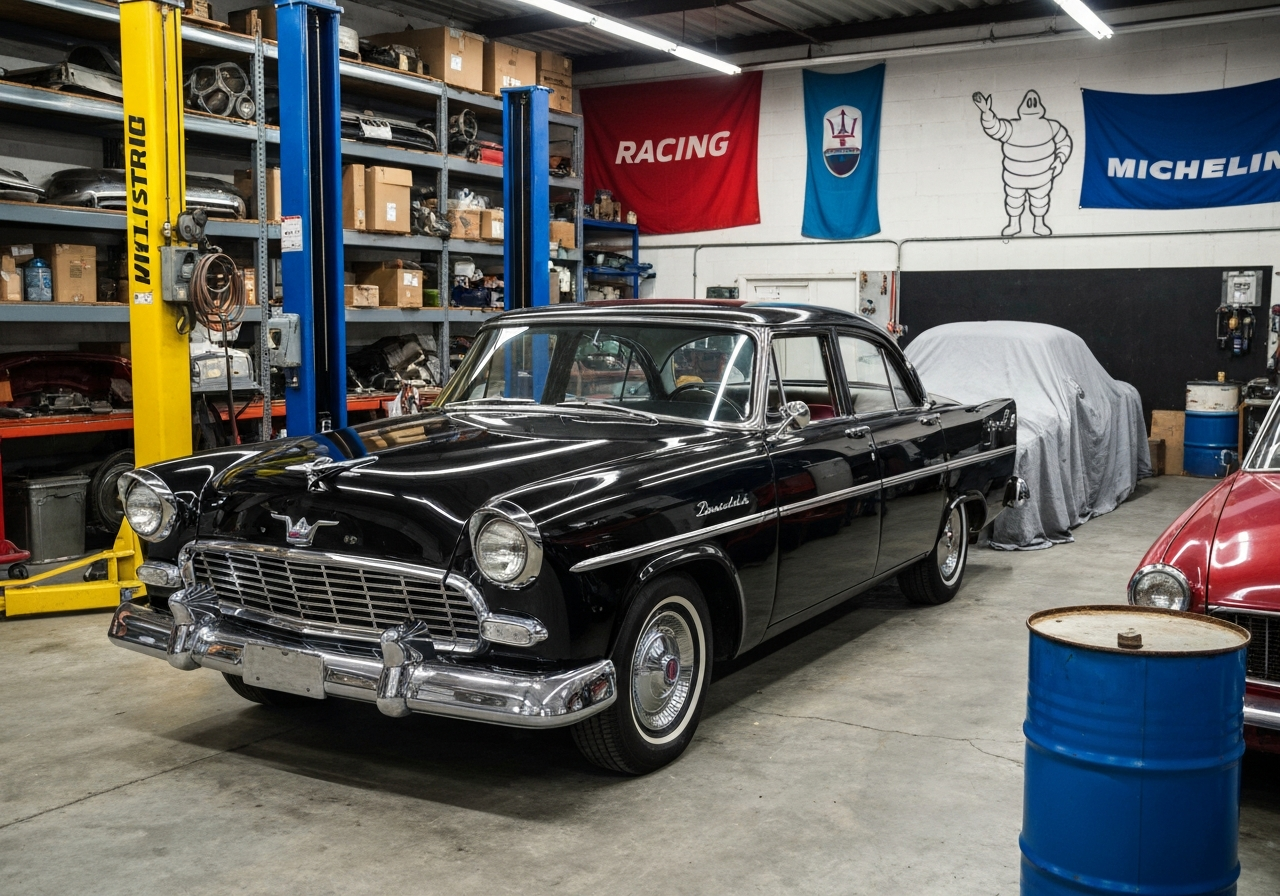
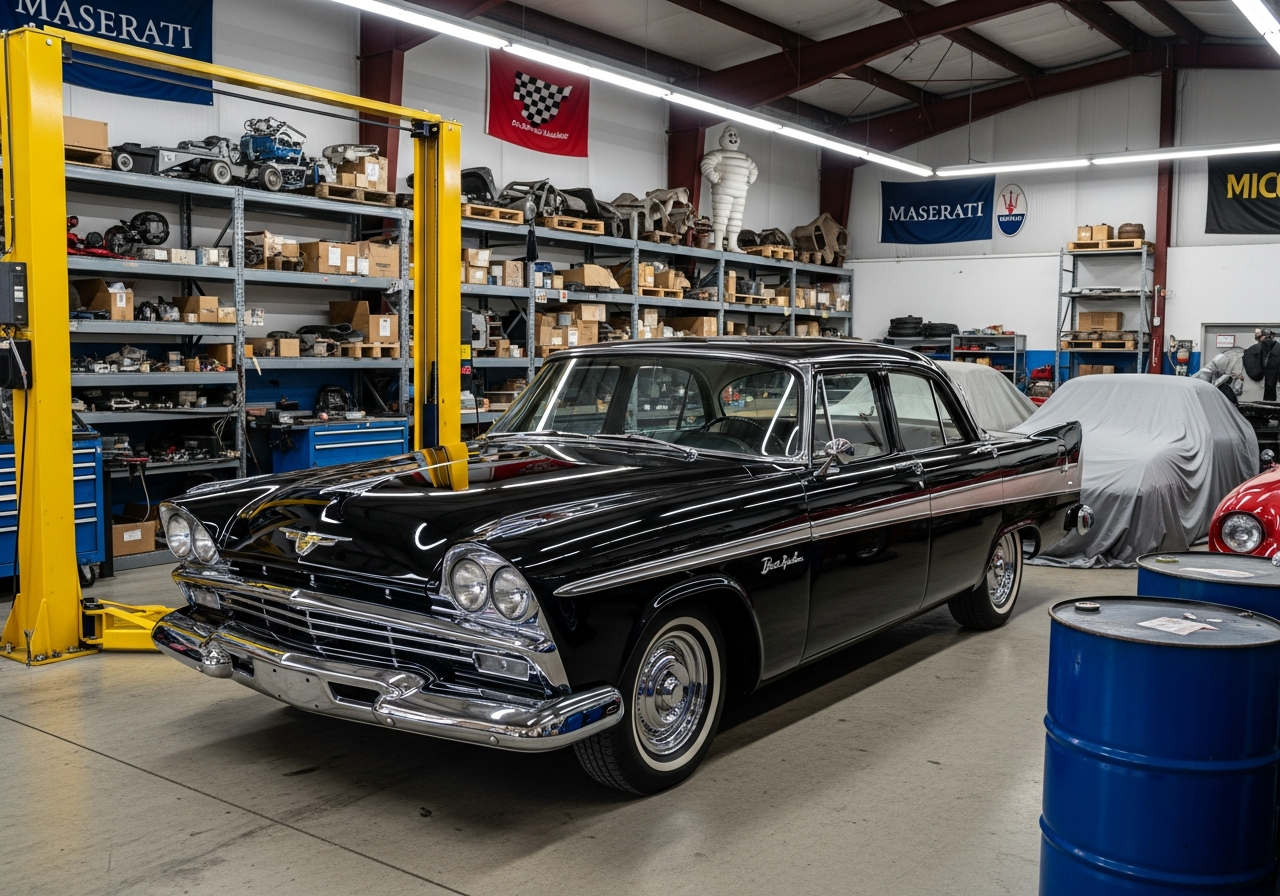
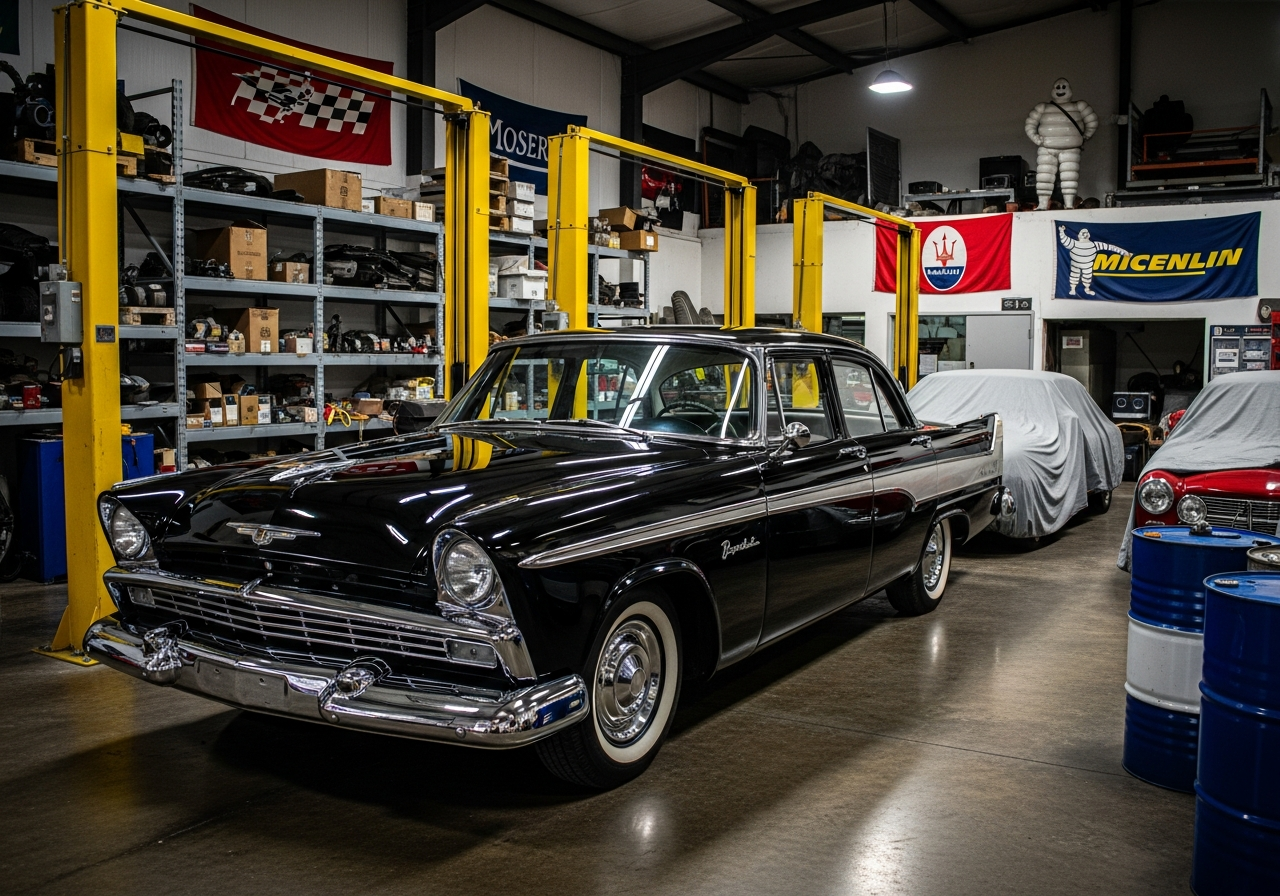
The cheap fast tier ($0.02) rendered "MICHELIN" and "RACING" correctly. The expensive ultra tier ($0.06), the one with the gorgeous reflections, wrote "MICENLIN", plus an illegible chrome script badge. Standard, for what it's worth, produced the cleanest "MASERATI" of the three. So the in-image-text ranking is inverted from the price ranking. Cheapest wins, most expensive loses.
Fast ($0.02) spelled MICHELIN right. Ultra ($0.06) wrote MICENLIN. The 3× premium bought gloss, not correctness.
The per-tier scores make the split obvious. Photorealism rises with price, text quality falls.
| Tier | Cost | Element coverage | In-image text | Photorealism | Overall |
|---|---|---|---|---|---|
| Fast | $0.02 | 87% | best (MICHELIN + RACING correct) | 82% | 82 |
| Standard | $0.04 | 93% | fair (cleanest MASERATI) | 92% | 89 |
| Ultra | $0.06 | 95% | poor (MICENLIN, garbled badge) | 95% | 90 |
Note the trade fast made for that text win: it got the lift colour wrong (blue instead of yellow) and the lighting is flatter. So this isn't "fast is secretly the best tier." It's narrower and more interesting than that. The axis you'd most want to pay to fix is the one axis the money doesn't touch.
The real villain: text, in both directions
Once you go looking, text isn't just a tier quirk. It's the unified failure mode of the whole image suite, and it fails two ways at once.
It can't reliably render the text you ask for. Garbled badges, misspelled brands, illegible script, at every tier, including ultra.
It can't reliably suppress the text you didn't ask for. Across the broader proven-asset corpus I scored alongside the car, a plain "NO TEXT" rule was the single most-violated constraint in the whole set. The model wants to draw words.
And there's a self-inflicted amplifier worth flagging loudly, because it's a mistake that's easy to make in a prompt.
Warning. Putting hex colour codes or brand names in your prompt makes the model literally draw them as on-image text. I watched it stamp
#110033A,SAP, andIntuitstraight onto images as visible labels, including into images that were supposed to have no text at all. If you mean a colour, describe the colour. Don't hand the model a string and hope it treats it as an instruction instead of content.
There's independent corroboration that this is the real pain point and not just my scoring being fussy. The low-scoring assets in the corpus were exactly the ones the team later had to re-run as *-no-text, *-clean, and *-final-textfree variants. When the people using the tool keep adding "no really, no text" to their filenames, the benchmark and the practitioners agree.
What this means if you're buying
The take-home is the same shape as the LLM cost story earlier in the series. Paying more buys a different thing than you assume it does, and here that's gloss instead of correctness. Imagen 4's scene and subject adherence is genuinely strong. On the hard recreation the car averaged 88, which actually beat the proven-asset baseline of 80.3. So adherence holds up under a hard task. But its weakness is text, the weakness is at every tier, and money does not fix it. The $0.06 ultra tier is no better than the $0.02 fast tier on the one thing you'd most want the premium to buy, legible text. You're paying for chrome and reflections, full stop.
So if your image needs words in it (a logo, a label, a sign, a badge), don't reach for the expensive tier expecting it to solve spelling. It won't. Generate at the cheap tier, budget for retries, and plan to drop critical text in as a real type layer afterward rather than praying the diffusion model spells it.
Coming next: does local close the gap?
The obvious follow-up is the one I haven't run yet. Everything above is cloud Imagen. The local side is still pending: Z-Image Turbo as the fast-tier analogue and FLUX (via Nunchaku int4) as the ultra-tier analogue, driven over LAN from ComfyUI on the same RTX 3080 the rest of this series uses. ComfyUI and the model weights aren't installed yet, so no local numbers exist to compare against. That's the head-to-head this series has been building toward: a frontier-vs-on-box image shootout on the identical recreate-this-photo task, scored the same way. It's coming, not done.
When that runs, the question gets sharper than "fast vs ultra." It becomes this. Can a free, local diffusion model on a 10GB card hold the same scene adherence Imagen showed here, and does it have the same text problem, or a different one? That's Part 4.
Takeaways
- Across Imagen 4's tiers, the 3× premium buys photorealism (82% → 95%) but not legible text. The cheap $0.02 fast tier spelled the signage right while the $0.06 ultra tier didn't.
- Text is the suite-wide failure mode in both directions. The model can't reliably render the words you ask for, and can't suppress the ones you didn't. Describe colours, and never paste hex codes or brand strings into a prompt.
- If an image needs real words, generate cheap, budget for retries, and composite the text as a type layer afterward. The local Z-Image / FLUX head-to-head is still coming in Part 4.